

Alibre Design 3D CAD
25% off all new licenses and upgrades
plus
Update old licenses without penalty
Promotion discounts apply until 30th November 2026.
Version 29.1 has launched
with the new Alibre Design
Weldments Module
for people who make things
#1 CAD software for price/performance ratio
#1 Best Traditional Perpetual License
# Ranks in top five 3D mechanical CAD programs.
# Free Training


Elevate your design projects with Alibre Design 3D modelling CAD software.
Alibre advantage...
Easy-to-use tools designed to streamline your design, process.
Intuitive workflows make it easy to get started and stay productive.
Advanced Modeling Parametric and rules-based modeling for managing complex parts and assemblies.
Comprehensive Toolset. Dedicated tools for modeling, sheet metal, assembly, drawing, Bill of Materials, rendering, and data-driven design.
Industry-leading compatibility with other software ensures smooth integration into your existing workflow.
Python-based scripting language to automate repetitive tasks and enhance efficiency.
Discover the benefits of software ownership
Alibre Design is a powerful and affordable alternative to the big, expensive CAD programs.
Don't pay for features you don't use. Alibre Design has easy to understand, user-friendly tools that will achieve the same results.
Don't be held hostage by compulsory subscriptions. When you purchase an Alibre license you own it outright – no limitations or permissions required. Alibre software is installed directly on your computer, and your files are saved and stored on your computer so you have complete control without relying on a cloud system.
Alibre is dedicated to innovation and development, striving for three new releases each year, along with free online training and exceptional support to enhance your experience.
Reviews
Name: Adrian
Industry: Mechanical or Industrial EngineeringCompany
Used Weekly for 2+ years
Overall rating Value for Money Ease of Use Customer Support
Likelihood to recommend10.0 /10
Easy for a CAD noob
Reviewed on 7/11/2023
Absolutely easy to work with lots good tutorials good forum.Mature software!
Pros: Easy-software is yours no suscription-good tutorials-good forum-nice people
Name: Ryan
Industry: DesignCompany
Used Daily for 2+ years
Reviewed on 18/03/2026
Been using Alibre since 2015 and it is a solid program that works well. Great value for the money with a permanent license, great customer support on the rare occasion I have a question. I use it for 3d design for both in house machining, outsourced machine work, 3d printing, and assemblies for machine design.
Conclusion: I don't have any major dislikes about Alibre, it just works and doesn't give me any troubles. .
Name: Michel M.
Industry: Industrial Designer
Used for the last 16 years, I produced hundreds of parts that have been fabricated in many shops for many customers. I sent hundreds of STEP files for laser cutting, bending, moulding, extrusion and I never had a supplier complain about the quality of the part files. Alibre really gave me the performance I was expecting. When I first decided to learn 3D after 20 years of 2D on Autocad, I decided to buy Alibre in 2006. The purchase price and the maintenance cost were my main motivations when I compared with a big alternate software. I have been a serious user for the last 16 years and I have no regret about my decision.
Conclusion: Ease of UseCustomer Service and FeaturesValue for Money
Name: Jason
Industry: Education Management
Used Weekly for 2+ years
Overall rating Value for Money Ease of Use Customer Support
Likelihood to recommend10.0 /10 When you can't afford SW, get Alibre!
Reviewed on: 25/03/2025
Awesome! I have MeshCam also which I use with my Carbide 3D Nomad cnc machine. Even though I teach SolidWorks to students, I pitch this software to them when they graduate because it is affordable, effective, the support is top notch with same day(sometimes hour) response.
Pros: The support is excellent. Always available within moments of asking for support help. That alone is priceless.
Name: Mike
Industry: Consumer Goods
Company size: Self Employed
Used Weekly for 2+ years
Overall rating Value for Money Ease of Use and Customer Support
Likelihood to recommend10.0 /10 Best Bang-for-Buck 3D CAD software
Reviewed on 20/11/2025
Overall, I like using Alibre Design Pro. I can pretty much design anything I that can imagine at this point, and the workflow progression feels very natural and efficient. I'm using Alibre Design Pro for both machining and 3D printing projects, and really enjoy being able to iterate and improve my designs quickly, from concept through to finished product; Alibre is a good tool to have in my toolbox, at an affordable price.ProsAlibre Design was easy to learn, coming from SolidWorks, which I use at my day job. Alibre's pricing and licensing policy are very fair, and offer the best bang-for-buck, of all of the 3D CAD programs that I looked into, for my hobby and small business use. I started with Alibre Atom, and after a year, upgraded.
Name: Julian
Industry: Electrical/Electronic Manufacturing
Used Daily for 2+ years
Overall rating Value for Money Ease of Use Customer Support
Likelihood to recommend 8.0 /10 Way to go Alibre
Reviewed on 21/11/2025
A lot of our tasks involve setting jigs for small production runs. Maybe for alignment or to hold parts for press fitting. Ten minutes in Alibre, output an .stp for the slicer and the job is a good 'un.
Pros: Not at all the steep learning curve I've come to expect from complex design software. Alibre really is a breeze to use.It is in daily use for general mechanical design, 2D workshop drawings, and an ever growing number of 3D printing jobs. There is nothing it cannot do for us.We are a tiny design and manufacturing operation so keeping control of expenditure is extremely important. Alibre's licensing options are perfect for this. There's masses of "how to..." videos on YT and elsewhere, one is never at a loss how to do something.
Cons: This is a tough one - there's not really anything to dislike.
Alibre Design Expert.
The Ultimate 3D CAD Software for Professionals.
Probably the best value for buck 3D CAD software.
Unlock Powerful 3D CAD Tools with Alibre Design Expert.
Get every modeling and detailing tool, part and assembly configurations, global design variables, sheet metal modeling, motion features, spread-sheet control and more
Sheet Metal
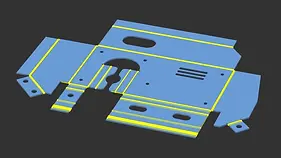
Alibre Design Expert version includes a full suite of sheet metal design tools. Design your ideas, produce developments and export profile files, and produce drawings.
PDM
Alibre Design Expert version includes PDM so you can manage all your files and store project and part details for easy sorting and retrieval.
Photo-rendering
Alibre Design Expert version includes Keyshot software to produce stunning images of models. Edit materials and lighting to create realistic scenes.



Alibre Expert Version new license
NZ$4417.00 Now $3087.80
(No maintenance)
NZ$5055.00 Now $3791.80
(Incl 1st year of maintenance)
Upgrade to Alibre Expert Version
Upgrade your Professional to Expert
NZ$2064.00 Now $1547.70
(Incl 1 year of free maintenance)
Upgrade your Atom3D to Expert Version.
NZ$3760.00 Now $2820.00
(Incl 1 year of free maintenance)

Link to the Alibre website to see a full comparison chart of features

Similar to the Expert version without the following:
No Sheet-metal tools.
No Configurations of parts or assemblies.
No Global design tools.
No Dynamic part library.
Less file export/import options.
Alibre Design Professional

Excellent value for any designer not involved with sheet-metal work.
Brilliant for everyone creating complex part designs for CNC machining and 3D CAD printing.
Alibre Professional Version new lic.
NZ $2064.00 Now $1547.70
(No Maintenance included.)
NZ$2778.00 Now $2083.40
(including 1st year of maintenance)
Upgrade to Alibre Professional Version
Upgrade your Atom3D license to Alibre Professional version.
NZ$1617.00 Now $1212.70
Prices quoted NZ$. GST not included.

Alibre Atom3D
Designed for hobby users and professionals
Alibre Atom3D new lic.
NZ $367.00 Now $275.40
(No updates)
NZ $474.00 Now $355.70
(Incl 1st year of updates)
Prices in NZ$. GST not included.
Precision 3D Modeling
Equipped with all the essential tools minus the clutter, Alibre Atom3D lets you stay focused on designing without the hassle.
Perfect for hobbyists, makers, and DIY enthusiasts. Start your journey with a free trial today!
Providing precision modelling, seamless file compatibility, and easy-to-learn tools for 3D printing, CNC, and more.


Alibre for Students, Trainers and Hobby Groups
Alibre are keen supporters of students working towards qualifications in all subjects
Teachers
Provide your students with high-quality 3D Parametric CAD by purchasing a class set of Alibre Design software and avoid worrying about internet connections to the Cloud.
Alibre provides training material at no cost.
Contact us to discuss how we can help you provide CAD for your students.
Students
Alibre will provide very affordable 3D Parametric CAD at a generously discounted price so you can own your license and work where and when you want.
Produce high-quality designs and drawings on your computer, save all your work files on your own computer and use them for later production.
No subscriptions to pay , and not cloud connection required. Keep your back-ups where you want them.
The student version is identical to the full commercial versions and all drawings can be printed without watermarks.
Proof of current student status must be provided. Alibre perpetual license means your software will not stop working when you are finished your studies.
Hobby Clubs and Members
Members of Model Engineering Clubs and Maker Clubs, Alibre offer special discounted pricing to support your hobby groups and their members.
If you are a member of a Model Engineering Club or Maker Club, contact us for a quote.
Proof of membership is required.
New Features - Version 29.1.1
Release date: Sept. 23rd, 2026.
New Weldments Workspace
-
Sketch Layout: Build structural frameworks using 2D and 3D sketch layouts.
-
Add Structures from Library: Insert standard structural profiles (such as C-channels and tubes) onto sketch paths.
-
Refine Intersections: Trim, extend, and cope corners for accurate, clean, or gapped fit-ups.
-
Metadata & Cutlists: Set individual metadata per weldment structure and annotate them in drawings using Weldment Balloons that reference the weldment cutlist.
-
Finish with Modeling Tools: Combine weldment bodies with standard part modeling tools.
Part & Assembly Updates
-
Midline Constraint Hover: Hovering over a midline constraint symbol now highlights the associated sketch nodes in parts.
-
Sheet Metal Favorites: Favorites have been added to the inputs on the Sheet Metal Parameters dialog.
-
Assembly Save Dialog Fix: Addressed an issue where some workflows caused "No Image Data" text to display instead of the folder icon in the assembly save dialog.
-
BOM & PDM Fixes: Resolved various drag-and-drop issues in Bill of Materials (BOM) cells, rows, and columns, and fixed a PDM issue causing column headers to appear in the wrong language.
API Additions
-
Extended APIs: New API support has been added for feature mirrors, entire part mirrors, helical bosses, helical cuts, linear/circular feature and topology patterns, and both constant and variable fillets.
-
Portal Access: Added a new customer portal link directly from the Home Window to help users manage and self-administer licenses.

CAM Software
CAM software takes information from your CAD file and uses it to create a G-code instruction file to drive your CNC machine.
We offer three CAM software options to suit your requirements:
MeshCAM Very Low-priced, basic, easy to use and very capable CAM Mill software ideal for your hobby projects and a great tool to learn about CNC G-code creation.
Scroll down for more info.
MeshCAM can be purchased as a package deal with Alibre Atom3D
under the name of Alibre Workshop.
Ez-CAM From Ezcam Solutions Inc. www.ezcam.com
Producers of EZ-Mill, EZ-Turn and Ez-EDM
EZ-CAM products integrate with Alibre Design CAD
Scroll down for more info.
SprutCAM X From SprutCAM Tech www.sprutcam.com
Producers of SprutCAM X
SprutCAM X is integrated and supports direct import of parts from Alibre Design via an add-on.
Scroll down for more info.

MeshCAM Pro
MeshCAM is the fastest way to generate G-code and it's perfect for Non-Machinists.
Any owner of an Alibre Expert or Professional license can purchase a stand-alone license for MeshCAM Pro, at a very attractive discount, and start creating G-code for their machining requirements, or if you are starting out, purchase an Alibre Workshop Package and get Alibre Atom3D plus MeshCAM Pro.
MeshCAM Pro is made for people who just want to make parts now.
Like Alibre software, when you buy MeshCAM it runs on your machine, not the cloud. You will not pay monthly or yearly fees to keep it active.
Here’s the update policy for MeshCAM:
-
You will get all updates to the current version of MeshCAM (currently Version 9) forever.
-
If a new version is released within 3 months of your purchase, you’ll get it for free.
Here’s the MeshCAM process:
-
Load a file from either version of Alibre Design or Alibre Atom3D
-
Accepts files from almost any CAD program
-
Build an efficient toolpath with minimal input
-
Save G-code that works on your CNC machine
-
Don’t let the simplicity fool you, MeshCAM has lots of flexibility and options for advanced machining.
MeshCAM Pro includes a 3D toolpath simulator that will show you not only where the tool will go, but how the finished part will look.
MeshCAM has more toolpath options than any competing CAM program.
-
Contour offset and parallel roughing.
-
Unified and Parallel finishing
-
Pencil finishing
-
Cutouts
-
Drilling
Alibre workshop
MeshCAM Pro plus Alibre Atom3D makes up our bundle called Alibre Workshop.
Everything you need to create the G-code that talks to your CNC machinery.
Alibre Workshop
NZ $812.00 + GST
MeshCAM Pro Additional license.
Any owner of an Alibre Expert license can purchase a stand-alone license for MeshCAM Pro and start creating G-code for their machining requirements.
Contact us for pricing.

EZ-CAM Mill Solutions
EZ-MILL EXPRESS
A simplified 2-axis machining version of EZ-Mill at a great price.
EZ-MILL

EzMILL Express
NZ$1796.00 + GST

Includes all the EZ-MILL Express functionality plus Gears/Splines/ Cams Geometry Creation, 2.5D milling operations applied to imported solid models, 4th axis indexing/wrapping and a 3D profiling cycle.
EzMILL
NZ$4474.00 + GST
EZ-MILL PRO
Extends the standard EZ-MILL capabilities to meet the demanding needs of the prototype, tooling, die and mold professional.
EzMILL Pro
NZ$7153.00 + GST
EZ-CAM Turn Solutions
EZ-TURN EXRESS
A simplified version of the popular EZ-Turn program at a great price. EZ-Turn Express Machining Cycles include Pocketing with unlimited islands, Hole Patterns and Lettering
EZ-TURN

EzTurn Express
NZ$1796.00 + GST

EZ-TURN is an advanced turning and integrated Turn/Mill programming system designed to allow both turning and milling operations to be defined directly from 3D data. Stock roughing, multi-pass profiling, threading, grooving, drilling, cut-off, and bar pull. Supports multiple spindles, turrets, and coordinate systems. Best CNC Lathe Software All Lathes.
EzTurn
NZ$4474.00 + GST
EZ-EDM
EZ-EDM is a sophisticated 2 through 5 axis wire EDM system. Newly developed Punch and Die features help reduce workload by combining all task related operations into simplified and user-friendly dialogs. Convenient auto male/female part recognition plus access to every single wire movement via the motion record provides full control of taper and wire compensation registers at all times. Now imports solids and surface models via IGES and STL. Best CNC Wire EDM Software

EzPDM
NZ$4465.00 + GST
EZ-CAM and TURN EXPRESS PACKAGE
EX-MILL EXPRESS and EZ-TURN EXPRESSS bundled together for an affordable entry point to run your mill and lathe. Great value.
EzMILL-TURN EXPRESS
NZ$2680.00 + GST
SprutCAM.
SprutCAM X
Fully integrated with Alibre Design for ease of editing and transfer to CNC software.
SprutCAM supports import of IGES, STP, STL, PARASOLID and DXF files.
Easy to learn as program prompts appropriate next move and guides you through the setup process.
SprutCAM offers a wide variety of applications and solutions to manufacturing.
AlibreTraining is FREE.
Learning to develop your designs has never been easier. Alibre provides a range of ways you can learn how to make parts and assemblies and produce them as workshop drawings, and export files for CNC machining and 3D printing operations.
The Alibre Knowledge Base
Provides information on licensing, installation, part design, and general display and system settings.
Alibre Training Course
On-line, free self-paced course covering the fundamentals of 3D modeling, drawings, and more.
Alibre on YouTube
The dedicated YouTube channel has easy-to-follow video demonstrations on all parts of the design and drawing process using Aibre Design.
Alibre Power Guide
A pdf download training/reference book containing detailed instructions and exercises to teach you everything you need to know about using Alibre 3D parametric design software. Comes with your license.
Alibre Forum
Where Alibre users and Alibre Management post tips and suggestions. You can post questions and read replies from exerienced.
Alibre Support
Alibre Support is an email service that connects you to Alibre Experts who will answer the more difficult questions you might have. This service is only available to users who have current Annual Maintance.
email: support@alibre.com
Alibre on facebook
You can join interesting conversations, and learn many tips and tricks, by simply going to facebook.
About
Bay CAD Services Ltd are the dealer for Alibre Design 3D CAD software in both Australia and New Zealand, and have been involved with Alibre since just one year after it's original release in 1997.
We have over 30 years of 2D and 3D CAD training experience in New Zealand.
Our mission is to provide businesses and individuals with affordable, cutting-edge design solutions.

